JavaFX ScrollPane
Jakob Jenkov |
The JavaFX ScrollPane control is a container that has two scrollbars around the component
it contains if the component is larger than the visible area of the ScrollPane. The scrollbars enable the user
to scroll around the component shown inside the ScrollPane, so different parts of the component can be seen.
The JavaFX ScrollPane controls is represented by the JavaFX class javafx.scene.control.ScrollPane.
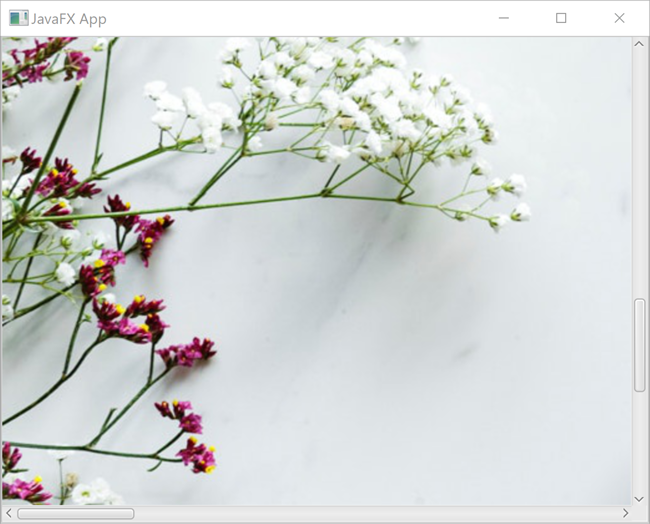
Here is a screenshot of a JavaFX ScrollPane with a JavaFX ImageView
inside:
Create a ScrollPane
To use a JavaFX ScrollPane you must first create a ScrollPane instance.
Here is an example of creating a JavaFX ScrollPane instance:
ScrollPane scrollPane = new ScrollPane();
Set ScrollPane Content
Once you have created a JavaFX ScrollPane instance you can set the content you want it to
display via its setContent() method. Here is an example that sets a JavaFX ImageView
as content of a JavaFX ScrollPane:
ScrollPane scrollPane = new ScrollPane();

String imagePath = "images/aerial-beverage-caffeine-972533.jpg";
ImageView imageView = new ImageView(new Image(new FileInputStream(imagePath)));

scrollPane.setContent(imageView);
ScrollPane Viewport
The visible part of a JavaFX ScrollPane is called the ScrollPane viewport.
As you scroll around the content displayed inside the ScrollPane using the scrollbars, the
viewport is moved around the content too, making different parts of the content visible.
Content With Effects or Transforms
If the content (JavaFX control) you want to display inside the JavaFX ScrollPane uses effects
or transforms, you must first wrap these controls in a JavaFX Group. Otherwise the
content won't be displayed correctly.
Pannable ScrollPane
By default the user can only navigate around the content displayed in a JavaFX ScrollPane using
its scrollbars. However, it is possible to make a JavaFX ScrollPane pannable.
A pannable ScrollPane enables the user to navigate its content by holding down the left mouse button
and move the mouse around. This will have the same effect as using the scrollbars. However, using panning you
can move the content along both X and Y axis simultaneously. This is not possible using the scrollbars, where
the user can only operate one scrollbar at a time.
To switch a JavaFX ScrollPane into pannable mode you must set its pannableProperty
to the value true. Here is an example of switching a JavaFX ScrollPane into
pannable mode:
scrollPane.pannableProperty().set(true);
Fit To Width
The JavaFX ScrollPane fitToWidth property can make the ScrollPane fit
its content to the width of the ScrollPane viewport. To do so, the fitToWidth
property must be set to the value true. This property is ignored if the content node is not
resizable. Here is an example of setting the JavaFX ScrollPane fitToWidth property
to true:
scrollPane.fitToWidthProperty().set(true);
Fit To Height
The JavaFX ScrollPane fitToHeight property can make the ScrollPane fit
its content to the height of the ScrollPane viewport. To do so, the fitToHeight
property must be set to the value true. This property is ignored if the content node is not
resizable. Here is an example of setting the JavaFX ScrollPane fitToHeight property
to true:
scrollPane.fitToHeightProperty().set(true);
Showing and Hiding Scrollbars via ScrollBar Policies
It is possible to specify when the JavaFX ScrollPane is to show the vertical and horizontal scrollbars.
You do so via the ScrollPane hbarPolicyProperty and vbarPolicyProperty
properties. These properties can be set to one of the ScrollPane.ScrollBarPolicy enum values.
You can choose from the values ALWAYS, AS_NEEDED and NEVER. Here is an
example of setting the hbarPolicyProperty and vbarPolicyProperty to
ScrollBarPolicy.NEVER:
scrollPane.hbarPolicyProperty().setValue(ScrollPane.ScrollBarPolicy.NEVER);
scrollPane.vbarPolicyProperty().setValue(ScrollPane.ScrollBarPolicy.NEVER);
The above example removes the vertical and horizonal scrollbar from the ScrollPane. Without the
scrollbars the user cannot use them to scroll around the content of the ScrollPane. However,
if the ScrollPane is in pannable mode (see earlier sections in this JavaFX ScrollPane tutorial)
the user can still grab the content and scroll around it with the mouse.
| Tweet | |
Jakob Jenkov | |